Drone Before-and-After Content for Pool Builders: The Transformation Posts That Go Viral
Key Takeaways
A strong drone transformation post begins before construction and stays useful after the final edit. Plan the shots, tell the project story clearly, and give interested viewers a sensible next step.
- Capture the property before excavation, then return at meaningful construction milestones.
- Match the before-and-after viewpoint so the scale of the change reads instantly.
- Edit for clarity and adapt the framing, hook, and captions to each platform.
- Connect the post to a relevant project page and track inquiry quality, not just views.
- Get homeowner permission, protect privacy, and follow applicable drone rules.
Why drone before-and-after posts grab attention
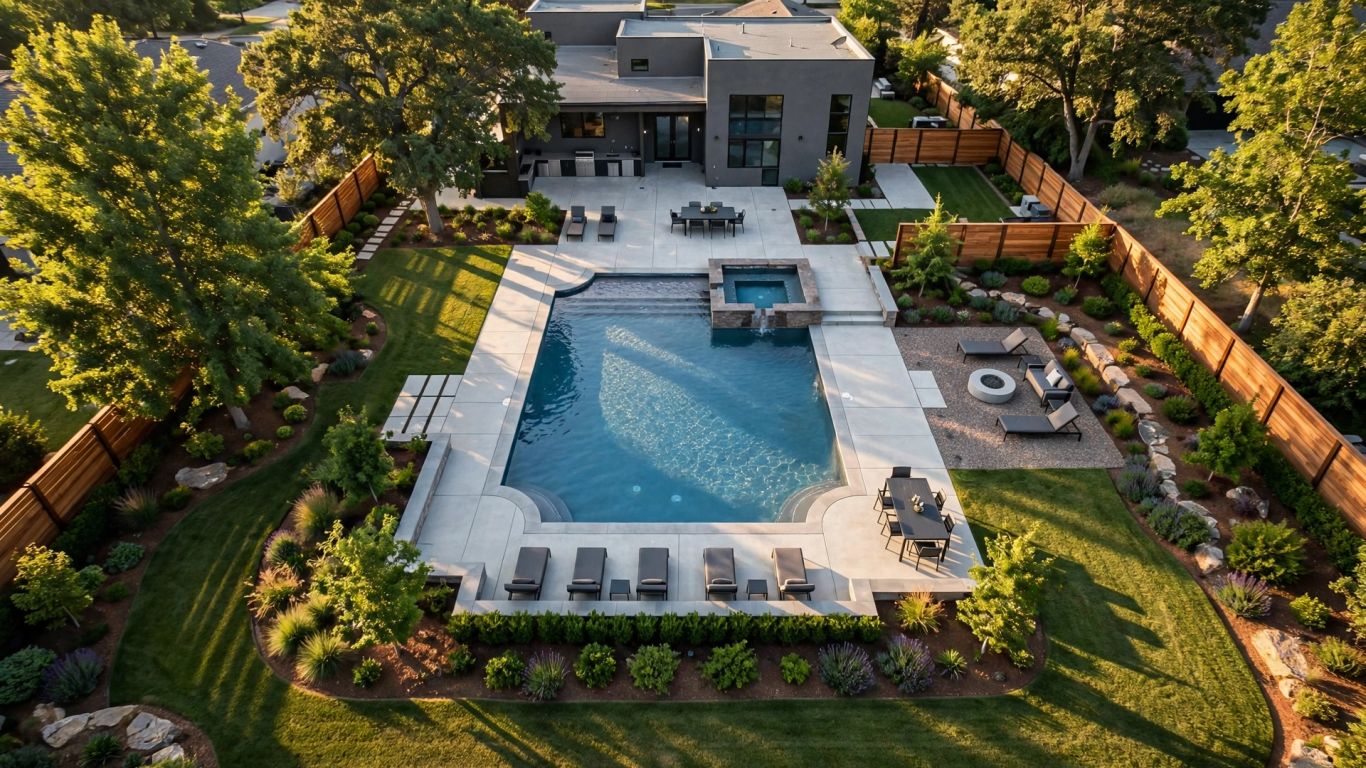
A pool project changes more than one part of a backyard: it can reshape the way the whole property is used and seen. Aerial footage makes that change legible in a few seconds, especially when viewers can compare the original yard with the completed space. The strongest posts make the work itself the story, rather than relying on a dramatic soundtrack or a claim that the video will go viral.
Show the full transformation, not just the finished pool
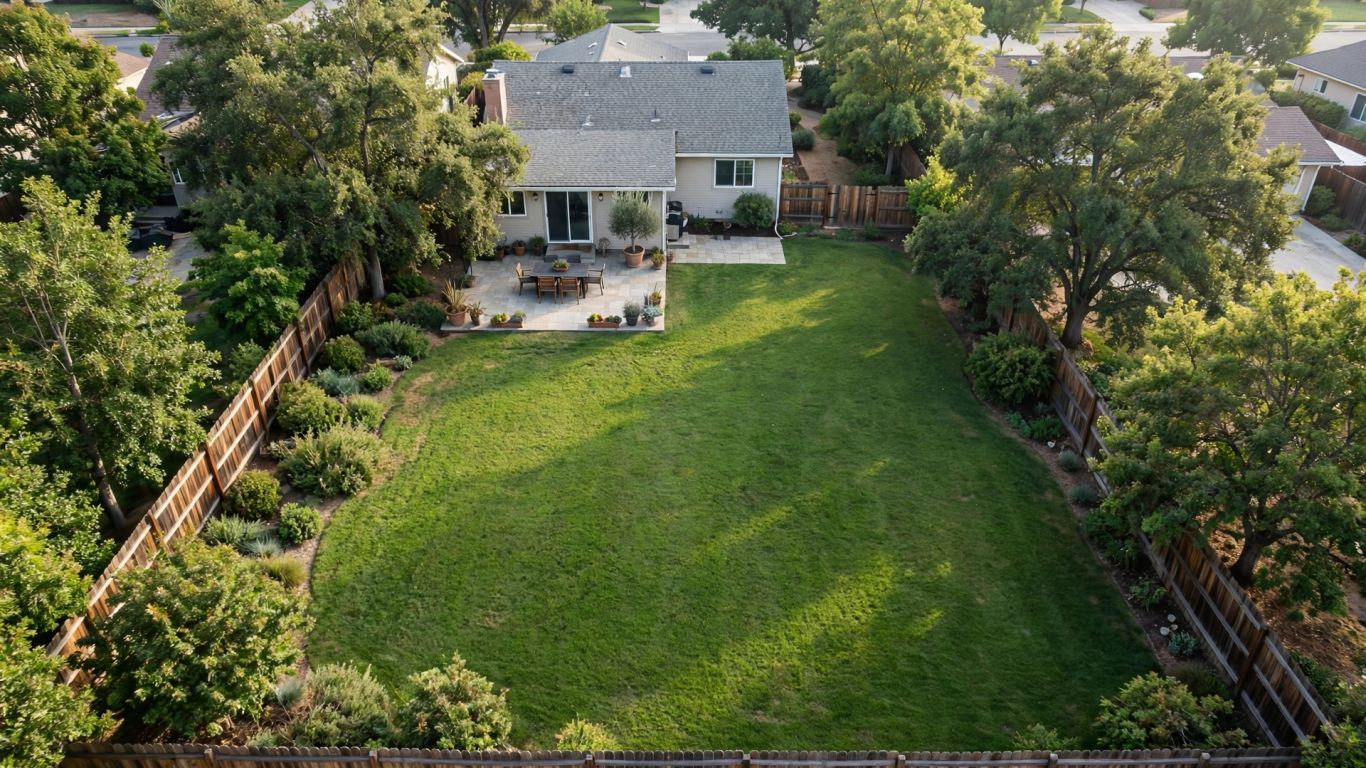
A polished shot of a finished pool is attractive, but it leaves viewers guessing about what the builder changed. Showing the yard before work began gives the finished scene a useful baseline: the original grade, open lawn, patio, or planting beds make the new layout easier to appreciate. When the project has several distinct stages, even a brief glimpse of the work in progress can help the finished result feel earned.
Make the contrast easy to understand at a glance
The viewer should not have to work out whether two shots show the same property. A consistent angle, a clean cut, and a simple stage label can make the difference clear before someone scrolls away. A quick comparison also helps a potential client picture the scale of a project on a real lot, rather than seeing only a collection of attractive pool details.
A small set of consistent visual choices can keep the comparison readable. For example, the shots below answer different questions without adding a lot of explanation:
| View | What it helps viewers notice | Best use |
|---|---|---|
| Wide aerial | Overall yard layout and pool placement | Establishing the before-and-after |
| Mid-range angle | Deck shape and nearby outdoor areas | Showing how the design fits the property |
| Close detail | Finish, coping, or water features | Giving the finished work texture |
| Matched split view | Direct change from the same viewpoint | A fast social comparison |
Use the wide view to orient people, then let details support the larger change. If the edit contains several angles, make the matched comparison the anchor rather than a fleeting shot.
Use the property and landscaping to add context
The pool is the focus, but the surrounding yard explains why the design works. Trees, fences, a patio, and the home’s position help viewers understand scale and how the finished space relates to the property. Keep those surroundings in frame when they add useful context; a tight crop that removes everything else can make a project feel less distinctive.
Set realistic expectations for what can gain traction
A satisfying transformation can earn attention, but no camera angle or edit guarantees a viral post. Reach depends on factors beyond the project itself, including the audience, the platform, timing, and whether the opening moment earns a pause. A viral clip can also attract attention for the wrong reasons; reports of drone-related pool damage are a reminder that safe, permitted filming matters more than a startling moment.
Treat each post as a chance to learn what local prospects respond to. Compare the quality of comments and inquiries with the view count, and do not judge the value of a project solely by its reach.
Plan the shoot before construction starts
The easiest time to arrange a before shot is before the yard changes. A quick plan made with the homeowner and project team helps avoid missed footage, awkward rescheduling, and shots that cannot be repeated later. Decide what the finished comparison should communicate, then work backward to identify the views and milestones needed to tell that story.
Choose a repeatable viewpoint and flight path
Pick a clear, safe viewpoint that captures the planned pool area and enough of the surrounding yard to establish context. Note the approximate height, direction, and framing so the later flight can reproduce the composition. A repeatable path is more valuable than a complicated one: a steady, recognizable view makes the before-and-after comparison feel intentional.
Capture the backyard before excavation begins
Film before equipment arrives or soil is disturbed, and capture a few seconds of stable footage rather than a rushed pass. Include the full work area and any existing features the design will change or preserve. If possible, take a still photo from the same viewpoint as well; it can serve as a simple reference when the construction is complete.
Schedule progress footage around key construction milestones
Not every workday needs a drone visit. Choose milestones that reveal a meaningful step in the project and coordinate them with the build schedule, since weather and jobsite activity can shift. A modest shot plan keeps filming purposeful:
- Original yard, before excavation begins.
- Excavation or layout, when the new footprint becomes visible.
- Pool shell and surrounding hardscape, when the design takes shape.
- Finished pool and landscaping, after the site is ready to present.
This sequence offers enough context to tell a story without turning the post into a day-by-day construction log. Keep notes on the camera position and date so footage can be matched and labeled accurately later.
Coordinate drone access with the homeowner and jobsite team
Confirm when the site is accessible, who will be present, and whether active work needs to pause during filming. The homeowner should understand what will be recorded and how the footage may be used. Clear coordination also gives crews a chance to secure loose materials and keep people out of the planned flight area.
Capture footage that makes the change feel dramatic
The sense of transformation comes from a useful comparison, not from dramatic movement alone. Stable footage, consistent framing, and a few thoughtfully chosen details let the project speak for itself. It is worth capturing more than one usable take, since a small difference in angle or timing can determine whether two clips cut together cleanly.
Match the before and after framing as closely as possible
Return to the recorded viewpoint and use the same general direction, height, and lens setting when conditions allow. Keep landmarks such as a fence corner or patio edge in similar positions in the frame. Small differences are inevitable as landscaping and structures change, but matching the stable features makes the central change much easier to see.
Include wide aerials and closer details of the finished work
A wide shot shows how the pool sits in the yard, while a closer view can reveal the finish, coping, steps, or water features. These shots serve different purposes, so avoid asking one angle to do everything. Use detail footage after the viewer has seen the overall layout; otherwise, the edit may look attractive but leave the project’s scale unclear.
Shoot in consistent lighting and weather conditions
A bright, clear day often makes color and water easier to read, but the before footage may have been filmed under different conditions. When you can, return at a similar time of day and avoid changing the exposure dramatically between stages. If the weather cannot be matched, favor a clean, steady image over heavy color adjustments that make the footage misleading.
Record enough footage for multiple edits and formats
Capture a few seconds before and after each move so an editor has room to cut. Hold steady shots longer than seems necessary while filming; the extra handles make it easier to create both a quick social version and a slower project-gallery edit. Keep the camera movement simple, and review clips on site when practical so a missing angle does not become apparent weeks later.
Edit the transformation into a compelling story
An edit should answer three questions quickly: what was there, what changed, and what does the finished space look like now? The order matters more than decorative effects. A clear beginning and ending give the viewer a reason to stay, while restrained transitions keep attention on the actual construction.
Open with the strongest visual contrast
Start with a matched before-and-after reveal, or show the original yard for a beat before cutting to the finished project. Choose the opening based on which clip reads cleanly on a small screen. If the viewer cannot recognize the difference without narration, simplify the sequence or use a brief label to orient them.
Use simple labels to show the project stages
Labels such as “before,” “construction,” and “completed” can explain the timeline without crowding the image. Keep them brief and place them where they do not cover the pool or other important details. Check that the words remain legible on a phone, and make sure the labels reflect the actual project sequence.
Keep transitions clear and the pacing brisk
A straightforward cut or split-screen comparison often makes the transformation easier to follow than a string of effects. Give each stage enough time to register, then remove pauses that do not add context. A quick pace is helpful, but rushing every shot can hide the work that makes the project distinctive.
Add music and captions that work without sound
Music can set a mood, but the video should still make sense when played silently. Add concise captions for the project stage or a relevant design detail, and check that they are readable against the footage. Keep the sound bed subordinate to the story and use music you have permission to publish on the chosen platform.
Adapt the post for social platforms and local discovery
One finished edit rarely fits every feed without adjustment. Aspect ratio, opening seconds, caption length, and audience expectations differ across placements, so plan for a small set of versions rather than relying on a single export. This is especially useful when a company wants to learn whether a project works best as an organic post, a paid creative test, or a landing-page asset.
Format versions for Instagram Reels, TikTok, Facebook, and YouTube Shorts
Keep the main action and important labels inside the safe area for each vertical format, and preview the crop before publishing. A version made for Instagram Reels, TikTok, Facebook, or YouTube Shorts may need a different opening frame or a slightly different duration. If the clip later becomes paid creative, Meta Ads and TikTok Ads are two distinct places where a business can run campaigns; treat each platform’s placement and audience as its own test, not a guaranteed source of leads.
Write platform-specific hooks and captions
The first line should tell a local viewer why this project is worth watching. One caption might lead with the size of the yard transformation, while another can focus on a design choice or the project location at a broad level. Avoid stuffing every service phrase into one post; a specific, natural caption usually gives people a clearer reason to respond.
Tag the project location without exposing private details
A city or general service area can help connect a project with nearby homeowners. Do not publish a street address, house number, or details that make the homeowner easy to identify. Ask what level of location detail the homeowner is comfortable sharing, and keep the public post consistent with that permission.
Use a repeatable pool company before after drone content workflow
A repeatable process helps the team produce useful footage even when several jobs are underway. Keep the steps simple enough to follow on a busy site:
- Confirm permission, flight conditions, and the planned viewpoint.
- Capture the baseline and note the camera position and date.
- Return for agreed milestones and the finished project.
- Edit platform versions, verify details, and save approved assets.
A short workflow makes handoffs clearer between the person filming, the editor, and whoever publishes the post. It also helps keep the pool company before after drone content consistent from one project to the next, without making every video look identical.
Turn views into qualified pool inquiries
A view is a useful signal, but it does not tell you whether the post reached a homeowner planning a pool. Give interested people a next step that matches what they have just watched, then measure what happens after the view. A good follow-up path makes the post part of the marketing system rather than an isolated piece of content.
Pair the transformation with a specific call to action
Ask viewers to take one action that fits the project: browse similar builds, request an estimate, or talk through options for their yard. Specific language is easier to act on than a generic invitation to “learn more.” Keep the promise modest and make sure the destination actually supports the action named in the post.
Link viewers to a project gallery or estimate page
Send interested viewers to a relevant page rather than making them hunt through a general homepage. A gallery can show more completed work; an estimate page can explain what information the company needs to start a conversation. If someone wants to discuss how to apply this approach, they can book a planning call as a separate next step.
Track profile visits, clicks, calls, and lead quality
Look beyond the play count. For a company running Google Ads, a dedicated project or service page can help connect ad clicks with a relevant next step, but the quality of the resulting inquiries still needs review. Track profile visits, link clicks, calls, and the share of inquiries that fit the company’s service area and project type; that mix provides a more useful picture than reach alone.
Repurpose strong footage in ads and on service pages
A well-documented project can serve more than one purpose: a short social post, a paid creative test, or a visual on a relevant service page. Choose footage that accurately reflects the work and give each placement a clear role. For paid campaigns, compare the response to the project’s actual business goal, and avoid assuming that a strong organic view count will automatically translate into booked estimates.
Protect homeowner trust and follow drone rules
A homeowner’s yard is private property, and a polished post is not worth damaging a relationship. Agree on what the crew will film, what can be shared, and when the footage may appear. Safe operation and accurate editing protect the homeowner, the team, and the credibility of the finished project.
Get written permission before filming and publishing
Ask for permission before a drone takes off, and separately confirm permission to publish the footage. Explain where the video may appear and whether the company intends to use it in paid promotion. Keep the approval with the project records so the team can check it before reusing clips later.
Avoid capturing neighbors, faces, or identifying details
Plan the shot to center the work area and avoid unnecessary views into neighboring yards or windows. Check the footage before publishing for people, vehicle plates, house numbers, or other identifying details. Cropping or blurring may help, but it is better to avoid collecting unnecessary footage in the first place.
Follow FAA requirements for commercial drone flights
Commercial drone flights must follow applicable FAA requirements, and the operator should verify current rules before each job. Check airspace, operating conditions, pilot qualifications, and any necessary authorization rather than relying on an old checklist. If the site presents a safety or compliance concern, postpone the flight and find another way to document the project.
Review every edit for accuracy before it goes live
Confirm that stage labels, captions, and project details are correct. Make sure the edit does not imply that the company completed work it did not perform or that a feature is standard when it was specific to that job. A final review by someone familiar with the project can catch a misleading crop or an incorrect description before it becomes public.
Plan Your Next Campaign
If you want a clearer plan for turning project content into home-service marketing, use Calendly to arrange a conversation with our team and discuss where your next campaign could start.
Conclusion
Drone before-and-after content works best when it is planned as part of the project, edited to make the change easy to understand, and connected to a useful next step. With homeowner trust, safety, and accurate measurement built into the process, each finished pool can become a clear story for the next local homeowner considering a build.
Frequently Asked Questions
When should a pool builder film the first drone shot?
Film the original yard before excavation or site preparation begins. That baseline gives the finished footage a clear point of comparison.
How many construction stages should a transformation video include?
There is no required number. Capture a few milestones that help viewers understand the change, such as the original yard, a visible construction stage, and the completed project.
What makes a before-and-after comparison easy to follow?
Use similar framing for both shots, keep the transition simple, and add a brief label if viewers might not recognize the project stage immediately.
Should every project video be posted in the same format?
Not necessarily. Check the framing and pacing for each platform, and make adjustments so key details remain visible in the version you publish.
Can a drone video guarantee a viral post?
No. A clear transformation may attract attention, but reach depends on many factors outside the footage. Treat each post as a chance to learn about the audience rather than a promise of a particular result.
What should a pool company measure besides views?
Track actions such as profile visits, link clicks, calls, and qualified inquiries. Those signals help show whether attention is reaching potential clients who fit the business.
Does a pool builder need permission to publish aerial footage?
Get the homeowner’s permission before filming and confirm separately that the footage may be published. Also avoid unnecessary views of neighbors and follow applicable drone rules.