Virtual Room Preview Tools: The CRO Weapon for Window Treatment Sites
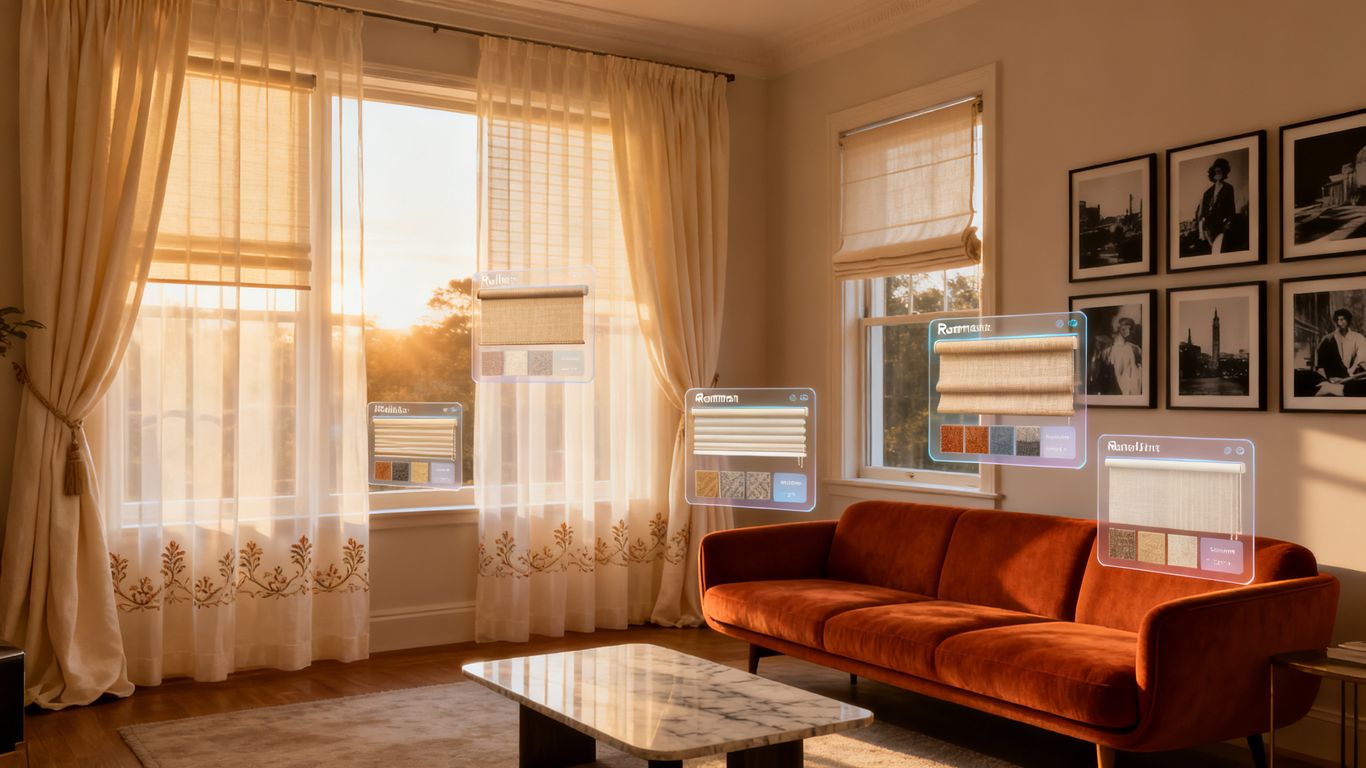
So, you sell window treatments online, right? And you're looking for ways to get more people to actually buy, not just browse. It's a common problem. People want to see how that new blind or curtain will look in *their* room before they commit. That's where virtual room preview tools come in. Think of them as your secret weapon for making sales, especially when you're trying to get people to click 'buy now'. We're talking about using this tech to help your conversion rate optimization (CRO) efforts, specifically for window treatment virtual room preview CRO.
Key Takeaways
- Virtual room preview tools let customers see how window treatments look in their own space, which is a big deal for online sales.
- Using these tools can make your website easier to use and help people decide to buy faster.
- Picking the right tech and making sure it works well on phones and computers is important for success.
- These previews help show off different styles and custom options, making customers feel more comfortable with their choices.
- You can track how well these tools are working by looking at user behavior and sales numbers, and use that info to make them even better.
Boosting Conversions With Virtual Room Previews
Understanding the Impact of Visualisation
Think about the last time you bought something online that you couldn't physically see first. Pretty nerve-wracking, right? Especially for something like window treatments, where color, texture, and how it actually looks in your space matters a lot. That's where virtual room previews come in. They're not just a fancy gimmick; they're a real tool to help people make up their minds. When customers can see how those new curtains or blinds will look in a room that resembles their own, it cuts down on a lot of the guesswork. This kind of visualization helps bridge the gap between browsing online and actually owning the product. It's like giving them a sneak peek before they commit.
The biggest hurdle for online sales, especially for home goods, is the inability for customers to physically interact with the product before purchase. Virtual previews directly address this by simulating that interaction in a digital space.
Enhancing User Experience for Window Treatments
Let's be honest, picking out window treatments can be a chore. There are so many styles, fabrics, and colors. A virtual preview tool makes this whole process way less of a headache. Instead of just looking at swatches or flat images, users can upload a photo of their own room or use a pre-made one and see how different options actually fit. This makes the experience more personal and frankly, more fun. It’s like having a personal shopper and interior designer rolled into one, right on your screen. This kind of interactive experience keeps people on your site longer and makes them more likely to find something they love. You can even use tools that let you change layouts, swap furniture, and refresh styles to get a feel for the whole room.
Here’s how it helps:
- Reduces decision fatigue: Users can quickly cycle through options without needing to imagine them.
- Increases engagement: Interactive tools keep users on the page and exploring more products.
- Personalizes the shopping trip: Customers see products in a context that feels relevant to them.
Driving Higher Conversion Rates
Ultimately, all this visualization and improved user experience boils down to one thing: more sales. When customers feel confident about how a product will look and perform in their home, they're much more likely to click that "buy" button. Virtual previews tackle buyer's remorse before it even starts. They help customers visualize the end result, making the purchase feel less like a risk and more like a sure thing. This confidence boost is a huge factor in pushing people over the edge from browsing to buying. It’s a direct path to better conversion rates for your window treatment business.
| Feature | Without Virtual Preview | With Virtual Preview |
|---|---|---|
| User Confidence | Low | High |
| Purchase Hesitation | High | Low |
| Time on Site | Shorter | Longer |
| Conversion Rate | Average | Higher |
Implementing Virtual Room Preview Tools Effectively
So, you've decided a virtual room preview tool is the way to go for your window treatment site. That's a smart move. But just having the tech isn't enough; you've got to put it to work the right way. It’s like buying a fancy new tool: you need to know how to use it to actually build something cool.
Choosing the Right Technology for Your Site
First off, what kind of tool are you even looking at? There are a few options out there, and they do different things. Some let users upload a photo of their actual room, which is pretty neat. Others use pre-made room templates that people can pick from. You'll want to think about what makes the most sense for your customers and the products you sell. Do you have a huge range of custom options? Maybe a tool that lets users design custom curtains is better. Or if you sell standard blinds, a simpler visualizer might do the trick.
Here’s a quick look at what to consider:
- User Input: Does it need a photo upload, or can users pick a sample room?
- Product Range: Can it show off all your different styles, colors, and patterns?
- Ease of Use: Is it simple enough for someone who isn't super tech-savvy?
- Cost: What's the price tag, and does it fit your budget?
Integrating Tools Seamlessly
Once you pick a tool, getting it onto your website needs to be smooth. Nobody wants to click around a bunch of confusing menus just to see how a blind will look. The best tools feel like a natural part of the shopping experience. Think about where it fits best: maybe right on the product page, or perhaps as a standalone feature people can access easily. You don't want it to feel tacked on. It should be right there when someone is thinking, "Hmm, would this look good in my living room?"
Optimizing for Mobile and Desktop
This is a big one. Most people browse on their phones these days, right? So, whatever virtual preview tool you choose, it absolutely has to work well on a small screen. If it’s clunky or slow on mobile, people will just leave. Test it out yourself on different devices. Does it load fast? Are the buttons easy to tap? Can you actually see the details of the window treatments? It needs to be just as good, if not better, on a phone as it is on a big desktop monitor. A good tool should let you see how different blinds will look in your home, no matter the device.
Making sure the tool is easy to use on both phones and computers is super important. If it's a pain to use on one, people might just skip it altogether and go somewhere else. Keep it simple and quick for everyone.
Getting this right means people will actually use the preview feature, which, in turn, helps them feel more confident about buying. And that’s what we’re aiming for, isn't it?
Leveraging Virtual Previews for Window Treatment Sales

So, you've got this cool virtual preview tool on your site. Great! But how do you actually make it work for selling more window treatments? It's not just about having the tech; it's about using it smart. Think of it as a digital showroom where customers can really get a feel for what they're buying, without the hassle of physical samples or confusing swatches.
Showcasing Product Variety and Customization
Window treatments aren't one-size-fits-all, right? People want options. They want to see how different fabrics, colors, and styles look in their space. This is where virtual previews shine. You can let customers cycle through dozens of patterns for blinds or explore various drapery pleats. It’s like having an endless catalog right at their fingertips.
- See every color option: No more guessing if 'ocean blue' is really blue or more of a teal.
- Compare different materials: Show the difference between sheer linen and blackout velvet.
- Visualize custom sizes: Let them input their window dimensions and see how the treatment fits perfectly.
This level of detail helps customers move past the 'what if' and get to the 'I want this'.
Reducing Purchase Hesitation
Buying window treatments can be a big decision. People worry about how it will look, if it will match their decor, or if they're making the right choice. Virtual previews tackle this head-on. By letting customers see the product in their own room, you cut down on that uncertainty. It’s a big step towards making them feel confident about clicking 'buy'.
The biggest hurdle for online shoppers is often the inability to physically interact with a product. Virtual previews bridge that gap, offering a tangible sense of the item even when it's digital.
Improving Customer Confidence
When a customer can visualize the final result, their confidence goes way up. They’re not just buying a product; they’re buying a solution to their decorating needs. This confidence translates directly into fewer returns and happier customers. It’s a win-win. You sell more, and they get exactly what they envisioned. This is a key part of conversion rate optimization, and tools like these are fantastic for improving website performance.
Here’s a quick look at how confidence can shift:
| Stage | Confidence Level (Pre-Preview) | Confidence Level (Post-Preview) |
|---|---|---|
| Browsing Products | Low | Medium |
| Customizing Options | Medium | High |
| Adding to Cart | Medium | Very High |
| Completing Purchase | High | Extremely High |
Ultimately, these tools aren't just fancy tech; they're practical solutions that help people make better buying decisions. And for businesses, that means better sales and a stronger online presence. If you're looking to boost your sales, exploring conversion rate optimization tools is a smart move.
Measuring the ROI of Virtual Room Preview Tools
So, you've put in the work to get a virtual room preview tool on your window treatment site. That's great! But how do you know if it's actually paying off? It’s not enough to just have the tech; you need to see if it’s making a real difference in your sales. We need to look at the numbers.
Key Performance Indicators for CRO
When we talk about measuring success, we're really looking at how these tools affect customer behavior and, ultimately, your bottom line. It’s about more than just page views. We want to see actual changes.
- Conversion Rate: This is the big one. Are more people buying after using the preview tool? We're talking about the percentage of visitors who complete a purchase.
- Average Order Value (AOV): Do customers spend more when they can visualize products? Sometimes seeing how things look together encourages bigger buys.
- Add-to-Cart Rate: Even if they don't buy right away, are they adding more items to their cart after using the tool? This shows interest.
- Bounce Rate: Are people sticking around longer on pages with the preview tool, or are they leaving quickly?
- Time on Site: Similar to bounce rate, a longer time spent suggests engagement.
Tracking User Engagement and Conversion Paths
Understanding how people use the tool is just as important as knowing if they use it. Where do they go before and after? What choices do they make within the previewer?
Think about the journey. A customer might land on a product page, use the virtual tool to see how a specific blind looks, then maybe switch to a curtain, and then add both to their cart. Tracking this path helps you see where the tool is most effective. Tools like ReimagineHome.ai's interior design tool can help map these interactions.
It’s easy to get lost in the data, but remember the goal: make it easier for people to buy. If the tool is clunky or confusing, it won't matter how many fancy metrics you track; it won't help.
Analyzing A/B Test Results
This is where you really get concrete proof. Set up A/B tests to compare versions of your site. One version has the virtual preview tool, and the other doesn't. Or, test different versions of the tool itself.
Here’s a simple way to think about it:
| Feature Tested | Group A (Control) | Group B (With Tool) | % Change | Notes |
|---|---|---|---|---|
| Conversion Rate | 2.5% | 3.8% | +52% | Significant uplift with preview tool |
| Average Order Value | $150 | $175 | +16.7% | Customers buying higher-value items |
| Bounce Rate (Product) | 45% | 30% | -33.3% | Users more engaged with visualization |
These kinds of tests show you, in black and white, the impact of the technology. You can see if the curtain visualizer apps are really moving the needle. Without this kind of testing, you're just guessing if your investment is worth it.
Advanced Strategies for Virtual Preview Optimization
Okay, so you've got your virtual room preview tools up and running. That's great! But are you really getting the most out of them? Just having the tech isn't enough; you need to think about how to make it even better. It’s like having a fancy new tool but only using it for the simplest jobs. We can do more.
Personalizing the Preview Experience
Think about it: not everyone wants to see the same thing. Some people might be looking for a specific style, while others are just browsing. Tailoring the preview can make a big difference. You could let users pick a room style that matches their own home, or even upload a photo of their actual space. This makes the preview feel way more relevant. Imagine seeing those new curtains in your living room, not just a generic one. It’s about making the tool work for the individual user, not just showing them a general demo.
Integrating with Marketing Campaigns
Don't let your virtual previews live in a silo. Connect them to your marketing efforts. If you're running an email campaign about a new line of blinds, make sure the link in the email takes users directly to a preview of those blinds in a sample room. Or, if a customer abandons their cart, send them a follow-up email with a personalized preview of the items they left behind. This keeps the momentum going and reminds them why they were interested in the first place. It's a smart way to keep your products top-of-mind.
Utilizing User-Generated Content
People trust what other people say and show. So, why not use that? If customers have shared photos of your window treatments in their homes, you can integrate those into your preview tool. Let users see how real people have styled your products. This adds a layer of authenticity that stock photos just can't match. It helps potential buyers visualize the products in a more relatable setting. It’s a powerful form of social proof that can really move the needle on conversions. For more on making your site work better, check out CRO experts' insights.
Making these tools work harder means thinking beyond the basic setup. It's about making the experience personal, connecting it to everything else you're doing, and using real-world examples to build trust. This kind of optimization is key to turning browsers into buyers.
Here’s a quick look at how different personalization tactics might perform:
| Feature
| Potential Impact on Conversion Rate |
|---|---|
| Style-based Room Selection | +5-10% |
| User Photo Upload | +8-15% |
| Real Customer Photos Display | +7-12% |
Remember, the goal of conversion rate optimization (CRO) is to make the path to purchase as smooth as possible. These advanced strategies help remove friction and build confidence, which is exactly what you want when selling window treatments online. Understanding why visitors leave without buying is part of this process, and these tools help address that directly. Learn about CRO.
The Future of Virtual Previews in E-commerce
So, where are these virtual preview tools headed? It's pretty exciting stuff, honestly. We're not just talking about seeing how a curtain might look anymore. The tech is getting way smarter, and it's going to change how we shop online quite a bit.
Emerging Technologies and Trends
Right now, a lot of the buzz is around making these previews even more realistic. Think about AI startups working on virtual try-on for clothes; they're aiming for accuracy and making it feel like you're actually there. This same kind of thinking is coming to home goods. We're seeing more advanced rendering, better lighting simulations, and even the ability to test different materials and textures in real-time. The goal is to make the digital experience almost indistinguishable from the physical one. It’s about getting past the flat images and into something truly interactive.
Expanding Applications Beyond Window Treatments
While we've focused on window treatments, this technology isn't stopping there. Imagine using similar tools for furniture placement, testing paint colors on your walls, or even seeing how a new rug would lay in your living room. It’s all about helping shoppers visualize products in their own space. This is especially true as AI revolutionizes virtual try-on technology, aiming for more realistic shopping behaviors.
The Evolving Role of CRO Tools
As these preview tools get better, they'll become even more important for conversion rate optimization (CRO). They're moving from being a nice-to-have feature to a core part of the online shopping journey.
- Increased Accuracy: Previews will get better at showing exact colors, patterns, and how light interacts with fabrics.
- Personalization: Tools will learn your style and suggest products that fit your existing decor.
- Integration: Expect these previews to connect more directly with marketing campaigns and social media.
The push is towards making online shopping less about guesswork and more about confident decision-making. If you can see it, you're more likely to buy it, and that's a win for everyone involved. It's a big shift from just looking at pictures on a website.
This evolution means that businesses need to stay on top of these changes. Keeping up with the latest developments in virtual try-on technology is key to staying competitive.
Imagine trying on clothes or seeing how furniture looks in your room, all without leaving your couch! That's the magic of virtual previews in online shopping. This cool tech is changing how we buy things online, making it easier and more fun. Want to see how it works for your business? Visit our website today to learn more and get started!
So, What's the Takeaway?
Look, adding a virtual room preview tool to your window treatment site might sound like a big tech thing, but honestly, it's just smart business. Think of it like giving your customers a try-before-you-buy experience, but for their own homes. It cuts down on guesswork for them and, more importantly, it helps them make a decision faster. For us running ads, that means fewer confused clicks and more people actually ready to talk to you. It’s a simple way to make your website work harder, turning browsers into buyers without you having to do all the heavy lifting. If you're serious about getting more leads from your online ads, this is one tool you should really be looking at.
Frequently Asked Questions
What exactly is a virtual room preview tool?
Imagine you're picking out new curtains or blinds for your living room. A virtual room preview tool is like a digital magic wand. It lets you upload a picture of your actual room and then 'try on' different window treatments right on your screen. You can see how that fancy new shade or stylish drapery would look before you even buy it. It's a super helpful way to visualize things without any guesswork.
How does seeing a product in my room help me buy window treatments?
It makes a huge difference! Instead of just looking at a picture of blinds on a website, you get to see them in *your* space. This helps you figure out if the color matches your walls, if the style fits your decor, and if it looks good with your furniture. It takes away a lot of the uncertainty, making you feel way more confident about your choice and less likely to return it later.
Can I really customize things with these tools?
Absolutely! Many of these tools let you play around with different options. You can often change the color, the material, the type of window treatment (like shades, blinds, or curtains), and sometimes even how it's installed. It's like having a personal design consultant right there, showing you all the possibilities for your specific windows.
Are these tools hard to use?
Not at all! Most of them are designed to be super user-friendly. You usually just need to upload a photo of your room, and then you can start clicking on different products to see them appear. They're built so that anyone can use them, even if you're not a tech whiz. It's meant to be a fun and easy part of shopping.
Will these tools work on my phone?
Yes, they should! Most companies that offer these virtual preview tools make sure they work on all sorts of devices, including smartphones and tablets. This means you can try out different looks for your windows whether you're sitting on your couch or on the go. It’s all about making it convenient for you.
How do these tools help the company selling the window treatments?
For the companies, these tools are fantastic for sales. When customers can clearly see what they're getting and feel sure about their choices, they're much more likely to buy. It also means fewer returns because people know what they're ordering. Plus, it makes the whole shopping experience more engaging and memorable, which keeps customers coming back.